
The Ultimate open-source content pipeline: 8 GitHub repos to automate all your content creation needs
Research, drafting, transcription, voice, visuals, and the automation that ties them together. Install steps and one real workflow for each.

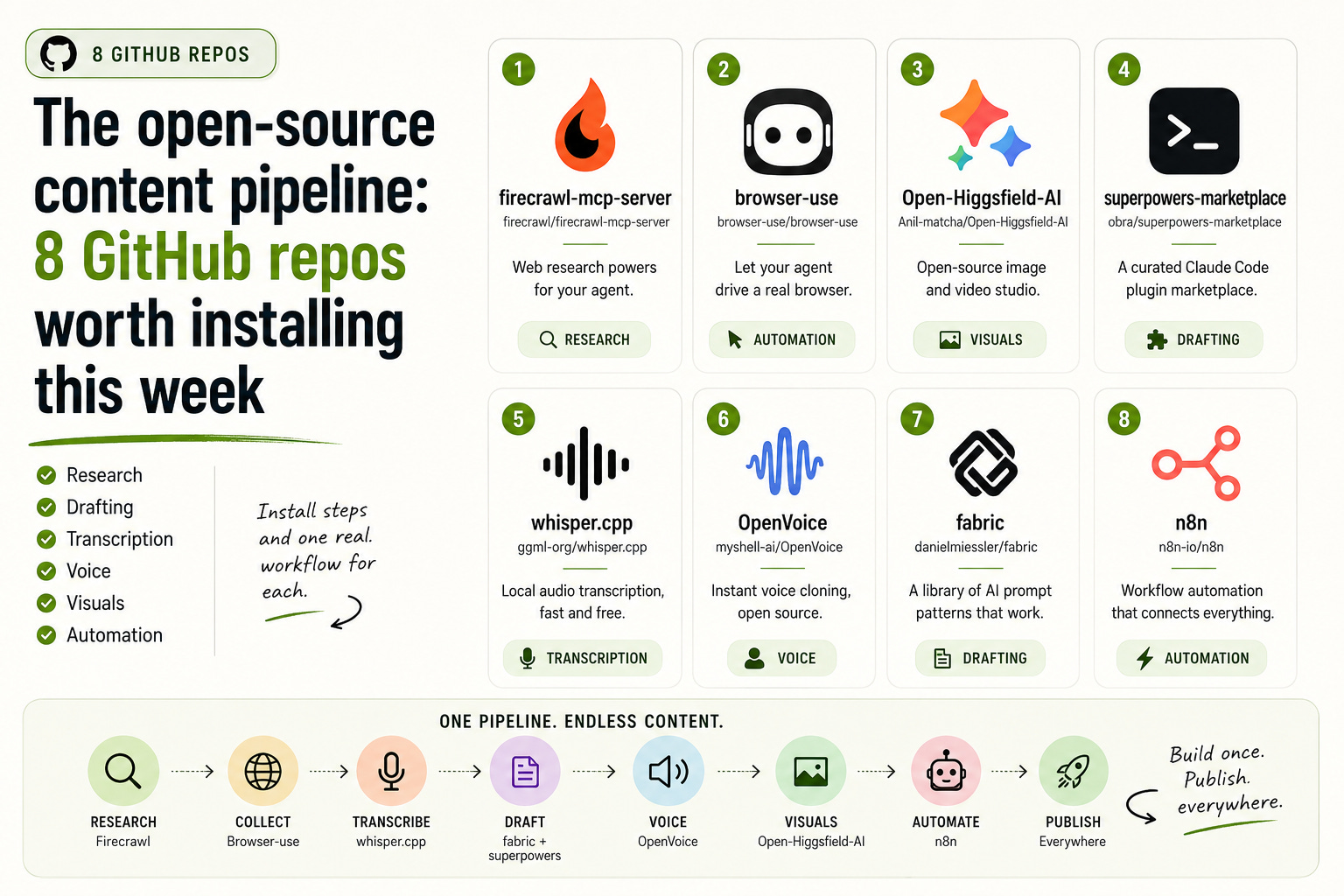
Most creators I talk to have the same setup. Six tabs open, three SaaS subscriptions auto-renewing, two of them barely used, and a workflow that feels held together with tape. The publish button shows up at the end of a Friday that should have ended hours earlier.
Here is the better news. The strongest content workflows in 2026 are not running on those SaaS stacks. They are running on a handful of GitHub repos. Free, open source, often more capable than the paid versions, and quietly powering the creators who seem to publish twice as much as everyone else.
This issue is the build guide for that stack. Eight repos covering every stage of a content pipeline: research, drafting, transcription, voice, visuals, and the automation that ties them together. For each one, what it does, how to install it, and the one workflow that earns the install.
1. firecrawl/firecrawl-mcp-server
Web research powers for your agent.
Status: active. License: MIT. [Firecrawl/firecrawl-mcp-server]
This is the official Firecrawl MCP server. Drop it into Claude Desktop, Cursor, or any MCP-compatible client and your agent gains five real research tools: firecrawl_scrape for clean markdown of a single page, firecrawl_map for the full URL list of a site, firecrawl_crawl for recursive crawls, firecrawl_search for web search, and firecrawl_extract for pulling structured data out of a list of URLs.
The catch is the API key. Firecrawl has a free tier that is fine for casual use, and heavy crawling will bill.
To install in Claude Desktop, edit claude_desktop_config.json and add:
{
  "mcpServers": {
    "firecrawl": {
      "command": "npx",
      "args": ["-y", "firecrawl-mcp"],
      "env": { "FIRECRAWL_API_KEY": "fc-YOUR_API_KEY" }
    }
  }
}
The same block works under Cursor’s MCP settings. Restart the client to pick it up.
The workflow that earns it. Pasting links into chat is fine. The real win is set-and-forget comparative research. Ask your agent:
'Use firecrawl to scrape these five competitor newsletter homepages to clean markdown, then tell me how their headlines are structured, what their dek conventions look like, and what their about pages emphasize.'
You get one comparison brief, with the raw source material kept structured enough to quote.
(The org rebranded from mendableai to firecrawl; old GitHub URLs auto-redirect.)
2. browser-use/browser-use
Let your agent drive a real browser.
Status: active. License: MIT. 83k-plus stars. Latest release 0.12.3, March 2026. [https://github.com/browser-use/browser-use]
browser-use lets an AI agent control a real Chromium browser through Playwright. The library is Python-first. You give it a task in plain English, point it at an LLM (their own ChatBrowserUse model, or Anthropic, Google, OpenAI, a local model), and it navigates pages, fills forms, clicks through flows, takes screenshots.
The catch is the local trade-off. Self-hosting is free and fast, and it does not give you IP rotation, stealth fingerprinting, or captcha solving. The team sells a Cloud version for those. For most creator work the local version is enough.
Install with uv (Python 3.11 or newer):
uv init && uv add browser-use && uv sync
uvx browser-use install              # one time, to grab Chromium
uvx browser-use init --template default   # writes a starter script
The starter script gives you a working Agent(task=..., llm=..., browser=...) you can edit. There is also a Claude Code skill if you prefer to drive browser-use from inside Claude Code:
mkdir -p ~/.claude/skills/browser-use
curl -o ~/.claude/skills/browser-use/SKILL.md \
  https://raw.githubusercontent.com/browser-use/browser-use/main/skills/browser-use/SKILL.md
The workflow that earns it. Automate a multi-step distribution you currently do by hand. A short script with one prompt, say “open my Substack draft URL, copy the title and subtitle, then go to LinkedIn and Twitter and pre-fill posts with that title and a short hook” can replace fifteen minutes of tab switching every issue. You still review and click publish; the agent does the assembly.
3. Anil-matcha/Open-Higgsfield-AI
Open-source image and video studio.
Status: active. License: MIT. [https://github.com/Anil-matcha/Open-Generative-AI]
A self-hosted UI that gives you Higgsfield-style creative workflows in one place: an Image Studio that flips between text-to-image and image-to-image as soon as you upload a reference, a Video Studio with the same dual mode, and a Cinema Studio with real camera controls (lens, focal length, aperture). The README lists 200-plus models in total, spanning Flux, Nano Banana 2, Seedream, Midjourney, Ideogram, Sora, Veo, Kling, and more. Some edit models accept up to 14 reference images.
The catch is straight: this is a wrapper UI. The inference runs through Muapi.ai, and a Muapi API key is required. The repo is free, the generation is not.
Install (Node 18 or newer):
git clone https://github.com/Anil-matcha/Open-Higgsfield-AI.git
cd Open-Higgsfield-AI
npm install
npm run dev
Open
http://localhost:5173
and paste your Muapi API key when prompted. For a production build: npm run build && npm run preview.
The workflow that earns it. Cover art for an issue or thumbnails for a video, without the round trip through three different SaaS tools. Upload two reference images of your visual style, switch to an edit model that accepts multiple references, write a one-line prompt, and you have something on-brand in under a minute. The Cinema Studio is what to reach for when you want a specific look: pick a 35mm focal length, an f/1.4 aperture, and a Classic Anamorphic lens, and the shot has the right depth and feel without you describing it in words.
4. obra/superpowers-marketplace
A curated Claude Code plugin marketplace.
Status: active. License: MIT for the marketplace metadata; individual plugins set their own. [https://github.com/obra/superpowers-marketplace]
Claude Code supports plugin marketplaces you can add with one command. obra/superpowers-marketplace is one of the more useful curated ones for non-developer work. As of this writing it carries three plugins:
Superpowers (Core). 20-plus skills, including
/brainstorm,/write-plan, and/execute-plancommands and a skills-search tool.Elements of Style. A skill that loads Strunk’s 1918 reference and applies its rules to your writing.
Superpowers: Developing for Claude Code. 42-plus docs for building your own Claude Code plugins, skills, and MCP servers.
The catch: quality varies across any marketplace, so read each plugin’s repo before installing. These three are best for writing and planning workflows, less so for visual work.
Install from inside Claude Code:
/plugin marketplace add obra/superpowers-marketplace
/plugin install superpowers@superpowers-marketplace
/plugin install elements-of-style@superpowers-marketplace
The workflow that earns it. Before drafting a long issue, run
/brainstormon the topic, then/write-planto get a structured outline you can edit, then/execute-planto draft section by section. With the Elements of Style skill loaded, ask Claude Code to copy-edit a finished section in the style of the loaded skill. You get tighter sentences without telling it what tight means.
5. ggml-org/whisper.cpp
Local audio transcription, fast and free.
Status: active. License: MIT. Around 50k stars. [https://github.com/ggml-org/whisper.cpp]
A port of OpenAI’s Whisper speech-to-text model in C and C++, from the same team behind ggml and llama.cpp. It runs locally on CPU or GPU, with no per-minute API bill. Every podcaster, video creator, and interviewer reaches the same wall eventually: I need clean text out of this audio. whisper.cpp answers that without sending the file to anyone.
The catch is small. The CLI expects 16-bit WAV input by default, so you may need a quick ffmpeg conversion step for MP3 or MP4 audio.
Install (clone, build, grab a model):
git clone https://github.com/ggml-org/whisper.cpp.git
cd whisper.cpp
sh ./models/download-ggml-model.sh base.en
cmake -B build
cmake --build build -j --config Release
Transcribe a file:
./build/bin/whisper-cli -m models/ggml-base.en.bin -f your-audio.wavThe workflow that earns it. Every podcast episode and long-form video, transcribed the moment you stop recording. Pipe the transcript into the next entry on this list and you have a draft summary, show notes, and a thread of pull quotes before you have finished closing the recording app.
6. myshell-ai/OpenVoice
Instant voice cloning, open source.
Status: active. License: MIT (both V1 and V2 since April 2024, free for commercial use). 36k-plus stars. Project of MIT and MyShell. [https://github.com/myshell-ai/OpenVoice]
A small audio sample of a target voice and a chunk of text are enough to produce speech in that voice. V2 supports English, Spanish, French, Chinese, Japanese, and Korean natively, with granular control over emotion, accent, rhythm, pauses, and intonation. The same model has been powering MyShell’s instant voice cloning since 2023, so the underlying tech has miles on it.
The catch is responsibility, not technical. Voice cloning is powerful and easy to misuse. Use it for your own voice (intros, narration, language localization of your own content) and get explicit consent before cloning anyone else’s.
Install:
git clone https://github.com/myshell-ai/OpenVoice.git
cd OpenVoice
pip install -r requirements.tx
The repo ships three demo notebooks (demo_part1.ipynb, demo_part2.ipynb, demo_part3.ipynb) and a docs/USAGE.md that walks you through V1 and V2. You will also pull the model checkpoints from the linked Hugging Face pages.
The workflow that earns it. Record a short reference clip of yourself. From then on, intro and outro lines for your podcast, audio versions of your written posts, or non-English narration of your own scripts can be generated from text. You stay in your own voice, and you stop re-recording the same intro every week.
7. danielmiessler/fabric
A library of AI prompt patterns built for human work.
Status: active. License: MIT. Around 40k stars. [https://github.com/danielmiessler/fabric]
Fabric is a framework for organizing the prompts that do real work, and a large crowdsourced catalog of those prompts (called Patterns) you can pipe text through from the command line. Patterns are written in Markdown and read like recipes: extract_wisdom, summarize_paper, create_5_sentence_summary, write_essay, youtube_summary, extract_insights, and many more. The list is built for content work.
The catch is that the binary is named fabric-ai, not fabric, when installed through Homebrew, Scoop, or the Arch package. The README suggests adding an alias.
Install (the one-line installer is the simplest path):
curl -fsSL https://raw.githubusercontent.com/danielmiessler/fabric/main/scripts/installer/install.sh | bashOr by package manager:
brew install fabric-ai         # macOS or Linux via Homebrew
scoop install fabric-ai        # Windows
go install github.com/danielmiessler/fabric/cmd/fabric@latest   # direct
After install, run fabric --setup to point it at your LLM provider.
The workflow that earns it. Pipe a podcast transcript (from the previous entry) straight into a pattern:
cat episode-12.txt | fabric --pattern extract_wisdom > insights.md
cat episode-12.txt | fabric --pattern create_5_sentence_summary > tldr.md
You go from a 90-minute transcript to show notes, a tweet thread, and a one-paragraph summary in about thirty seconds of compute. The patterns are good defaults; you can edit any of them, or write your own and check them in alongside your other content tools.
8. n8n-io/n8n
Workflow automation that connects every tool you already use.
Status: active. License: fair-code (Sustainable Use License). 186k-plus stars. 400-plus integrations and 900-plus ready-to-use templates. [https://github.com/n8n-io/n8n]
n8n is the pipeline glue. A visual workflow editor where you connect nodes (Substack, Gmail, Notion, Telegram, Discord, OpenAI, Anthropic, an HTTP request, your own code, and on, and on) into automations that run on a schedule or on an event. It is fair-code, not strict open source, which means free to self-host and free for almost all use except building your own commercial product on top of it. For creators that distinction does not matter.
The catch worth naming: fair-code is not OSI-approved open source. Read the LICENSE.md if your organization has strict open source requirements.
Install for a quick try (Node.js required):
npx n8nOr run it as a persistent service with Docker:
docker volume create n8n_data
docker run -it --rm --name n8n -p 5678:5678 \
  -v n8n_data:/home/node/.n8n docker.n8n.io/n8nio/n8n
Open the editor at
http://localhost:5678
The workflow that earns it. Build the publishing pipeline once and let it run forever. Trigger: new podcast episode in your hosting platform. Step 1: fetch the audio file. Step 2: run whisper.cpp via an HTTP node and get a transcript back. Step 3: pipe the transcript through a fabric pattern (or an LLM node) to draft show notes and three social posts. Step 4: drop the show notes into Substack and queue the social posts. Every step is a node you can edit. The first build takes an afternoon. After that, every episode publishes itself.
How to pick if you install only one this week
If your work is research-heavy, install the Firecrawl MCP first. It compounds with everything else you do.
If you make audio or video, install whisper.cpp first. It unlocks every other tool downstream that takes text as input.
If you write a lot, install fabric. The patterns are doing the work of dozens of careful prompts you would otherwise write by hand.
If your bottleneck is the distribution, install n8n and build one pipeline. The cumulative time saved is larger than any single tool’s.
If your bottleneck is visuals, set up Open-Higgsfield-AI and fund a small Muapi balance.
If you live inside Claude Code already, the superpowers marketplace is fifteen minutes of setup that pays back the same afternoon.
If you want your own voice in your audio without re-recording every intro, OpenVoice is the most considered open option, used responsibly.
If your bottleneck is clicking through publishing flows, browser-use writes the scripts you would otherwise write by hand.
A note before you close the tab
That is the stack. Eight repos, eight stages, one pipeline you actually own.
The interesting part is that none of this stays still. New repos ship every week that quietly replace something on this list. New patterns get added. Old favorites stop being maintained. Staying on the right tools is half the work of being a creator now, and most of us do not have time to read a hundred READMEs to figure out which ones are worth the install.
That is the whole reason this newsletter exists. If this saved you a few hours today, move us to your main inbox and give the future issues a read. I think you will want the next one in your inbox.
— Cheers!